 Skribble
These differences make it clear: Not every software is suitable for every organization. Carefully assess how well the Adobe Sign alternative fits your use case: technically, legally, and organizationally.
Adobe Sign alternatives: 7 tools compared including features, strengths & pricing overview
6min
·
Published on June 3, 2026
·
Updated on August 3, 2026


You have a choice: sign contracts with a click or go through the complicated process of printing, signing, scanning, and sending back. Electronic signatures save time, money, and hassle. Adobe Sign is a well-known provider, but many alternatives are also impressive.
When exchanging documents containing personal data or when dealing with contracts that require written form, the right hosting location, a reliable evidence structure, and compliance with European regulations are crucial. In this comparison, we will show you which Adobe Sign alternatives meet these requirements and how to find the right e-signature software.
Adobe Sign alternative – key points at a glance
- Not every tool covers all signature standards: Only a few providers allow simple, advanced, and qualified e-signatures in a single tool.
- The storage location affects the jurisdiction: Storing data outside of Europe can pose legal risks, such as access by foreign authorities.
- Fraud protection and traceability are important: A secure audit trail with timestamps protects in case of disputes and builds trust.
- External parties should also be able to sign easily: Some tools allow signing without an account: directly, securely, and accessibly.
What are the differences between Adobe Sign alternatives?
Differences are particularly evident in the legal framework, data protection, and technical foundations. Anyone looking for a suitable alternative should carefully examine the following aspects.
Legal framework and signature standards:
Not all tools cover the full range of legally recognized signature standards. This is particularly important for contracts that require a written form.
- Is the qualified electronic signature (QES) directly available?
- Can simple electronic signatures (SES) and advanced electronic signatures (AES) be used directly?
- Does a third party need to be involved, or is everything integrated into one tool?
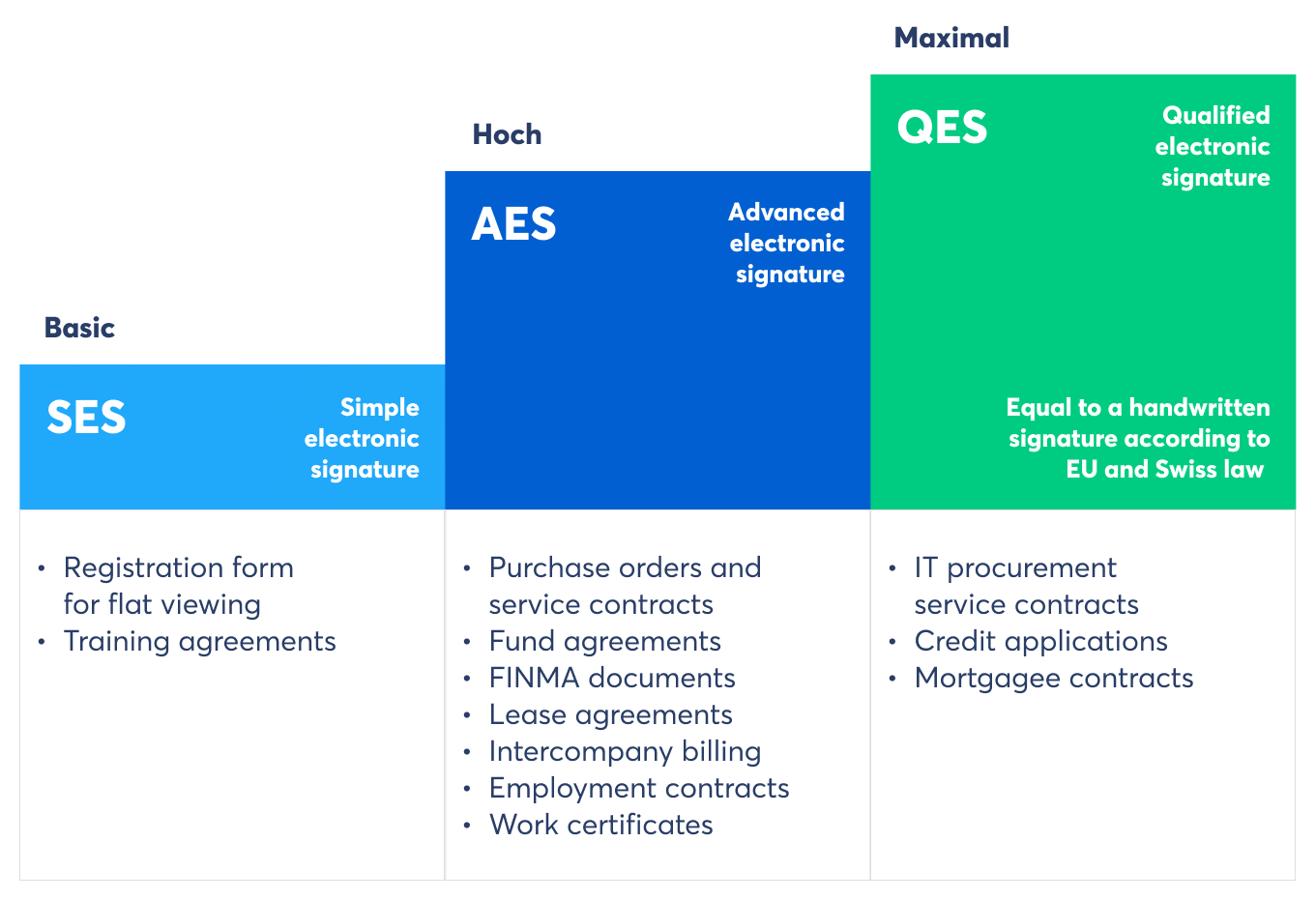
Mobiliar uses all three legally defined e-signature standards for different applications (Source: Skribble)
Data location and hosting structure:
The location where documents are stored affects legal protection. Hosting outside of Europe can lead to issues, such as the ruling “Schrems II”.
- Are the servers located in the EU or Switzerland?
- Are data processed and stored in an encrypted manner?
- Is there access by foreign authorities?
Transparency and legal traceability:
Reliable evidence of every action in the signature process is particularly important in case of disputes.
- Is there a tamper-proof logging of all actions?
- Are timestamps issued and retained for ten years?
- Is the test protocol tamper-proof?
Access options for external individuals:
In many cases, people need to sign digitally even if they do not have an account. An e-signature service without a registration requirement saves time.
- Can third parties sign documents without an account?
- Is there an integrated identity verification?
- Is access designed to be secure and accessible?
Structure and integration:
Depending on the area of application, it is important that the software can integrate into existing systems or operate independently.
- Are CRM, HR, or ERP systems supported?
- Can the tool be used directly through the browser?
- Is login via Single Sign-On (SSO) possible?
What features should a good e-signature software offer?
A reliable e-signature software should meet all legal requirements and function seamlessly in everyday use: clear, secure, and without technical hurdles. The following table outlines what to look for: from process management to mobile usage and system integration.
| Function area | Short description | Features to look out for |
|---|---|---|
Guided workflows | Structured signing process with full control for all parties involved. | - Set order |
Visibility and personalization | Custom branding and signature appearance customization. | - Insert logo in signature |
Accessibility and practicality | Use without barriers, directly in the browser, mobile and intuitive. | • Browser-based without installation |
Binding nature and availability | Legally binding through encrypted storage and audit logs. | - Encrypted storage |
Technical interfaces and scalability | Integration into existing systems and rights management. | - Integration with CRM/HR/accounting |
The 7 best Adobe Sign alternatives at a glance
If you are looking for a legally valid and data protection-compliant alternative to Adobe Sign, there are many compelling options available. The selection ranges from specialized European tools to internationally established platforms with extensive integration capabilities. Each tool has its own strengths depending on the use case, team size, and security requirements.
The following providers are currently popular alternatives to Adobe Sign:
- DocuSign: Global market leader with a wide range of integrations
- Skribble: Swiss provider with all signature standards and maximum legal validity
- Paperless: Form-based tool with unlimited users
- Yousign: EU-based e-signature platform with an intuitive workflow editor
- Dropbox Sign: Dropbox-integrated software focused on ease of use
- PandaDoc: Ideal for sales, proposals, and digital contract processes
- signNow: User-friendly and mobile-friendly
#1 DocuSign
DocuSign is one of the most well-known e-signature tools worldwide, used by millions of users in over 180 countries. The tool covers all eIDAS-compliant signature standards, is mobile-friendly, and offers a wide range of features from templates to complex workflows. You benefit especially from its high availability, international focus, and numerous integrations.
Benefits of DocuSign:
- Globally established: with over one billion users and more than 1,000 integrations
- Versatile usage options: mobile, offline, via SMS, or on the web with all three signature standards
- High availability: with 99.99% uptime and ISO-certified data storage
Overview of selected features:
- Creating and reusing templates with custom fields and workflows
- Web forms for quick data collection and integration into signature processes
- All three signature standards, including QES, are available.
- Authentication options via email, SMS, or ID check
- Test protocols, reports, and evidence documents with timestamp
- Integration in CRM, ERP, and cloud systems such as Salesforce, Microsoft 365, or Google
Pricing options:
DocuSign's Personal Plan is aimed at individuals (€14/month) and offers up to 5 envelopes. For teams, the Standard (€39/month/user) and Business Pro (€62/month/user) plans are available, featuring advanced functionalities such as conditional logic, attachments, and web forms. You can try the alternative to Adobe Sign for free for 30 days.
#2 Skribble
Skribble offers all three legally recognized e-signature standards (SES, AES, QES) on a single platform. They are legally valid throughout the EU and Switzerland. The e-signature software is designed for companies with strict requirements for data protection, traceability, and integrations. Skribble can be used without installation and provides numerous features for both small teams and large organizations.
Your benefits with Skribble:
- All signature standards in one tool: including qualified electronic signature (QES)
- Hosting and security according to European standards: no access by US services
- Legality and traceability: with audit logs and ISO-certified servers
Selected features at a glance:
- Creation and management of all e-signature standards (SES, AES, QES) without additional contract
- Visual design of the signature including logo and positioning
- Set the order of signers, add messages and attachments
- API integration into existing systems (Google Drive, Salesforce, SAP, Zapier, and more)
- External signers can participate without an account.
- Single Sign-On (SSO) and detailed access control via AD/LDAP
Pricing options:
Skribble offers various plans. Individuals can start from €9/month (with an annual subscription) for simple e-signatures, while teams gain access to all signature standards starting at €23/month. The Pro plan additionally provides more AES/QES and integrations from €36/month. For large organizations, an enterprise model is available upon request. All plans can be tested free for 14 days.
#3 Paperless
With Paperless, you can create, send, and securely sign forms and contracts in just a few minutes, without any prior knowledge. The platform provides complete control over the signing process and makes digital documents more accessible for all parties involved. With an unlimited number of users per plan, the tool remains straightforward and affordable.
Your benefits with Paperless:
- All three signature standards: Starting from the Business plan, the qualified electronic signature is also available to you.
- Complete freedom: Invite, edit, and have any number of people sign
- Reliable security: All processes are compliant with GDPR and eIDAS, hosted in Germany.
Selected features at a glance:
- All signature standards from the Business Plan onwards
- Intelligent workflows with approval steps and signing order
- Audit trail with timestamp for each signature
- User-friendly online identification when needed
- Automated reminders and bulk sending
- Integrated template library for frequently used documents
Pricing options:
All paperless plans include unlimited users at no additional cost. Small teams can start with the Basic plan for €179/month, while the Business plan for €319/month is recommended for more extensive workflows. An Enterprise offer is available upon request for larger organizations. A free 14-day trial is available at any time without payment details.
#4 Yousign
Yousign helps organizations digitize and accelerate their signing processes. The service complies with all legal requirements of the eIDAS regulation and relies on data storage within the EU. Its user-friendly interface integrates well with existing systems.
Benefits of Yousign:
- Save time: through automated reminders, templates, and signature workflows
- Create security: with GDPR-compliant hosting, audit logs, and authentication
- Signature standards: available from the Plus plan with AES and for an additional fee with QES
Selected features at a glance:
- Web app for signature processes via browser
- Creating and managing custom templates
- Signature order, reminders, and expiration dates can be set.
- Tamper-proof audit logs with timestamp (10 years of retention)
- API integration with tools like HubSpot, Zapier, or Salesforce
- Qualified electronic signature (QES) available as an add-on
Pricing options:
Getting started with Skribble is free, allowing for 2 signature requests per month. The "One" plan is designed for freelancers with occasional needs at €11/month, while the "Plus" plan offers unlimited signatures and additional features for €30/month. For teams requiring automation, the "Pro" plan is available for €48/month. All plans can be tested free for 14 days. The QES is available for an additional €10/month.
#5 Dropbox Sign
Dropbox Sign is the e-signature service from Dropbox, designed for teams and individuals who value a simple user interface, integrations, and legally binding signatures. The tool allows you to sign documents in seconds directly in your browser, through apps, or right from Dropbox. It emphasizes personalization, security, and clear workflows.
Benefits of Dropbox Sign:
- Intuitive and user-friendly: multiple awards for user-friendliness (G2 platform)
- Easily integrable: e.g., in Dropbox, Google Drive, Microsoft Word, or HubSpot
- Highest security standards: GDPR and eIDAS compliant, including QES, two-factor authentication, and audit logs
Overview of selected features:
- Reusable templates for structured document processes
- Custom branding and multilingual email communication
- No-code integration with popular CRM, cloud, and HR tools
- Automate reminders, signer sequences, and attachments
- Qualified electronic signatures with identity verification via video
- Seamless audit logs with timestamps and encrypted storage
Pricing options:
Dropbox Sign offers three main plans: The Essentials plan (€17.50/month) for individuals includes all basic features and unlimited signature requests. The Standard plan (€29/month per user) is designed for teams with enhanced features such as branding, template sharing, and integrations. The Premium plan is an offering with API access, advanced security features, and detailed reporting options. All plans can be tested for free in advance.
#6 PandaDoc
PandaDoc is an Adobe Fill & Sign alternative with a strong focus on proposal and contract creation. This is ideal for sales teams looking to both sign and design documents, as well as automate them. In addition to electronic signatures, PandaDoc offers a powerful document editor, CRM integrations, and tools for pricing or payments. The platform can be integrated into existing workflows and helps to visibly accelerate processes.
Benefits of PandaDoc:
- All-in-One platform for signing, document creation, tracking, and analysis
- Strong focus on sales with features for price lists, quote logic, and payment collection.
- Highest security standards with GDPR and SOC 2 compliance, as well as QES in the annual package
Selected features at a glance:
- Drag-and-drop editor for document design with multimedia
- Electronic signature with audit trail, SMS verification, and QES option
- CRM integrations (e.g., Salesforce, HubSpot) and webhooks
- Real-time notifications, signature tracking, and automatic reminders
- Approval workflows, role management, and team collaboration
- Reusable web forms, deal rooms, and content from a library
Pricing options:
PandaDoc offers three plans: The Starter plan at $35/month enables simple signing processes and the creation of up to five templates. The Business plan ($65/month) impresses with advanced features such as CRM integration, branding, and workflows. In the Enterprise plan (price upon request), you can utilize custom automations, CPQ functions, SSO, and API access. A 14-day free trial is available for all plans.
#7 signNow
signNow (by airSlate) is an alternative to Adobe Acrobat Sign that focuses on ease of use, mobile accessibility, and reliable security features. signNow supports all steps related to electronic signatures, from sending to legally binding archiving, whether on the go via smartphone, in the office, or within a team.
Advantages of signNow:
- User-friendly: easy to use on desktop or mobile, no training required
- Mobile-friendly: App usage, kiosk mode, and signatures on the go or offline
- High security standards: GDPR compliant, SOC 2 certified, with two-factor authentication, QES available for an additional fee
Overview of selected features:
- Drag-and-drop signature fields on desktop and mobile devices
- Definable signature order and multiple signers
- Real-time notifications and automatic reminders
- QES available for an additional fee
- API and CRM integration, e.g., for Salesforce, Dynamics, or Microsoft Teams
- Documents with attachments, Smart Fields, or kiosk mode available
Pricing options:
signNow offers four pricing tiers: The Business plan ($20/month) covers the basic features for individuals and small teams. Business Premium ($30/month) adds additional features such as bulk sending, payment collection, and group sending. The Enterprise plan ($50/month) includes enhanced security features, personalized workflows, and advanced authentication methods.
How do you find the right Adobe Sign alternative?
If you are looking for an alternative to Adobe Sign, you should carefully consider what your e-signature software needs to deliver. Not every software fits every organization. Some tools focus on integration with existing software systems, while others emphasize high security standards or very user-friendly operation. The right provider meets your legal requirements, reliably protects sensitive data, and can be used without technical knowledge.
Pay attention to three main things when making your selection:
- Legal validity: Are all three signature standards (SES, AES, QES) available?
- Hosting: Are your data stored within Europe?
- Usage: Can your teams easily create, send, and sign documents?
Is Skribble your optimal Adobe Sign alternative?
Skribble is a great choice if you value legal validity, ease of use, and data protection. As a European e-signature service, we meet all legal requirements in the EU and Switzerland. Over 4,000 companies, from small teams to international corporations, already trust our e-signatures.
Do you want to check if Skribble is right for you?
Test Skribble for free: no obligation and no installation required.
Adobe Sign alternative – Frequently asked questions and answers
Electronic signatures are considered very secure when used in an environment with certified data centers, strong AES-256 encryption, and tamper-proof logging. The qualified electronic signature offers the highest legal security level in the EU and Switzerland.


