 Skribble
Here’s what you should pay attention to:
- All three legally recognized e-signature standards: SES, AES, and QES
- Hosting, for example, in ISO-certified data centers
- Evidence such as timestamps and audit logs for each signature


Many HR teams are looking for an easy way to sign contracts legally without paper and long waiting times. If you want to speed up processes, engage candidates better, and ensure legal compliance, you need a suitable e-signing tool. We present seven e-signature software solutions that are suitable for HR, each with their features and pricing:
An e-signature software relieves your HR department, especially where speed, clarity, and <HTML_0>legality</HTML_1> are essential. Employment contracts, approvals, onboarding documents, or confidentiality agreements can be signed with just a few clicks.
This shortens many processes from several days to just a few minutes. Your HR department can save time on inquiries, avoid piles of paper, and simultaneously improve collaboration with other departments. Candidates and employees also benefit: they can review and sign documents directly on their mobile devices, without the need to print or scan documents.
What benefits does a digital signature tool bring to your HR department?
Not every signature software meets the requirements of your HR department. Especially for documents like employment contracts, target agreements, or internal approvals, legal clarity, ease of use, and high-level data protection are very important. Technical interfaces and reliable support should also not be underestimated. After all, the tool should support your processes, not complicate them.
To help you make structured decisions, it's worth taking a look at three important criteria.
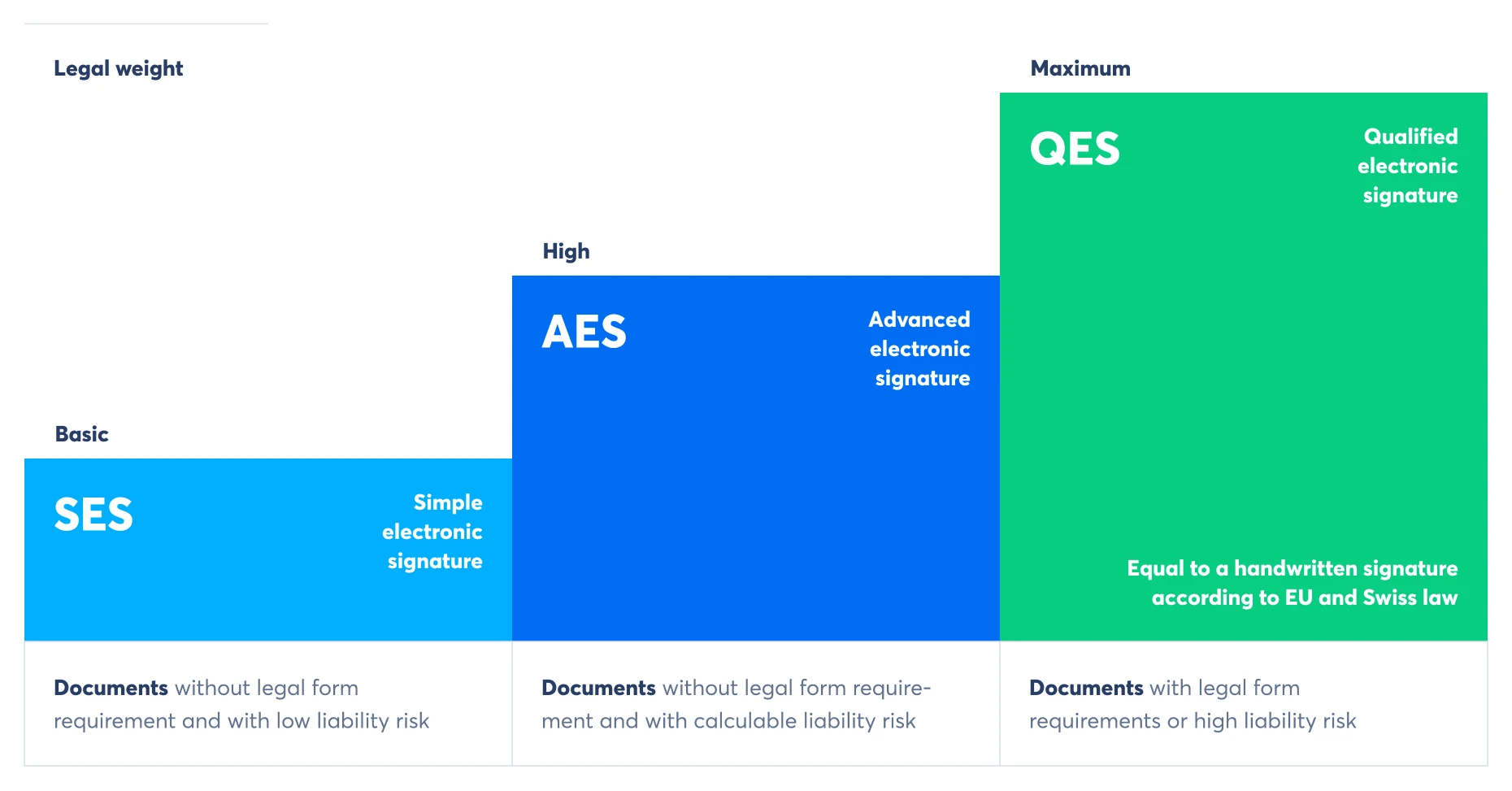
A good e-signature software meets the legal requirements of the eIDAS regulation, the European regulation for electronic signatures. It is also important that qualified electronic signatures (QES) are offered, as these are equivalent to handwritten signatures.
Additionally, you should check where the data is stored. If the servers are located outside the EU, there could be data protection risks. Certification according to ISO standards is another quality feature that builds trust.
Here’s what you should pay attention to:
Your HR department often works under time pressure. That's why it's even more important that the tool is intuitive and can be used without training or lengthy onboarding. Documents should be prepared and sent directly in the browser, both on a PC and on a smartphone. External parties should also be able to sign easily without needing to register.
A reliable German-speaking support team is available to assist with any questions and provides reassurance in daily operations. A free trial demonstrates how well the tool works in practice.
What could be beneficial for you:
The best e-signature software is of little use if it doesn't fit into your existing HR processes. Therefore, ensure that the tool can integrate with your HR software, document management system, or user management.
Interfaces such as API, Single Sign-On (SSO), or directory services like LDAP can be beneficial. A clear distribution of roles is also helpful: Who is allowed to sign, approve, or just read?
These points could help you in your decision-making:
| Criterion | Recommendation |
|---|---|
Signature standards | SES, AES and QES without additional contracts |
Hosting | In the EU or Switzerland, ISO certified |
Data protection | GDPR compliant, no US access |
Operation | Browser-based, mobile, no registration required |
Integration | API, SSO, integration with HR systems |
Support | In German, easily accessible, with a trial period |
For e-signatures to work smoothly in your HR department, the software needs specific features. It's not enough for documents to be signable; they must also be correctly assigned, legally verified, and easily retrievable. Especially in the HR sector, it is crucial that documents are handled confidentially and are provided with the appropriate signature.
Depending on the type of document, you need a simple, advanced, or qualified e-signature. Some tools make this selection easy without additional contracts or switching providers. Identification should also be simple and secure, for example via eID, SMS, or video identification.
To help you stay organized, automated processes are essential. These include signature workflows, reminders, and signature fields. For in-person discussions, a direct signature on the device can also be beneficial (In-Person Signing). Don't forget: features for permission management, secure protocols, and a clear record of each signature.
These e-signature features could be useful for you:
The selection of e-signature software for HR departments is vast. But which tools offer the best features, fair prices, and legally binding signatures for your HR processes? The following overview will assist you in making comparisons. We have reviewed the following e-signature providers for you:
Skribble is a cloud-based software for creating and managing electronic signatures in accordance with EU and Swiss law. The platform supports all three legally defined signature standards: simple (SES), advanced (AES), and qualified (QES). The software can be used in the browser or integrated into existing systems via API and plug-ins.
Selected features for HR departments
Benefits of Skribble
<a href="https://www.skribble.com/de-ch/preise/" data-link-type="Web" data-target="_blank">Pricing</a> & Plans
Skribble offers four plans, with monthly costs billed per user at €11 (Individual), €29 (Team), and €49 (Pro). The Individual plan includes 120 simple electronic signatures (SES) per year. The Team plan additionally includes 72 advanced or qualified electronic signatures (AES/QES) along with several management features. The Pro plan expands the signature quota to 120 AES/QES per year and also provides API access, branding options, and automatic retention periods; the Scale plan is negotiable.
Adobe Sign is the e-signature component within Adobe Acrobat and enables the electronic signing of PDF documents. The software is cloud-based, integrated into Acrobat Pro and Acrobat Standard, and can be used via desktop, web, or mobile. It is part of the Adobe Document Cloud and supports the sending, capturing, and tracking of signatures.
Selected features for HR departments
Benefits of Acrobat Sign
Prices & Plans
Acrobat Sign is available in two team plans: Acrobat Standard for €17.84 per license per month and Acrobat Pro for €28.55 per license per month, both with annual commitment and monthly billing. Both options include features for creating, editing, converting, and electronically signing PDF documents. The Pro plan also offers advanced signature features such as web forms, redaction tools, and integration with Microsoft 365 or SharePoint.
The software supports simple, advanced, and qualified electronic signatures in accordance with international regulations such as eIDAS and GDPR. In addition to signature features, DocuSign offers options for workflow automation, identity verification, and system integration.
Selected features for HR departments
Benefits of DocuSign
Prices & Plans
DocuSign offers three eSignature plans with monthly billing: The Personal plan costs €14 per month and allows up to 5 signature transactions ("envelopes") per month. The Standard plan is €39 per user per month and increases the quota to 10 envelopes, along with team features such as shared templates and commenting options. The Business Pro plan costs €62 per user per month and adds features like bulk sending, attachments, conditional logic, and payment requests.
Dropbox Sign is a cloud-based software for creating and managing electronic signatures. It supports simple and qualified electronic signatures in accordance with the eIDAS Regulation. The platform offers features for document sending, signature capture, data validation, and many integration options.
Selected features for HR departments
Benefits of Dropbox Sign
Prices & Plans
Dropbox Sign offers two standard plans with monthly billing: The "Essentials" plan costs €17.50 per month for individual users, while the "Standard" plan is priced at €29 per user per month and is designed for teams. Both plans include unlimited signature requests, audit trails, and basic integrations. The "Standard" plan expands the feature set with team functionalities, template links, branding options, and bulk sending.
Yousign is a European platform for electronic signatures that can be used via a cloud-based web app or API. It supports simple, advanced, and qualified electronic signatures in accordance with the eIDAS Regulation. The software offers features for document preparation, authentication, signature tracking, and team management.
Selected features for HR departments
Benefits of Yousign
Prices & Plans
d.velop sign offers three paid plans with monthly billing: The "sign basic" plan costs €9.99 per month and includes an annual quota of 50 signatures. The "sign business" plan is priced at €24.99 per month and covers 150 signatures per year, while the "sign ultimate" plan offers a quota of 250 signatures for €39.99 per month. All plans allow for unlimited users and include both seal and personal signatures in accordance with eIDAS. Additional signatures cost €4.50 each, and custom logos and support are included.
d.velop sign is a cloud-based software for digitally signing PDF and XML documents. It supports simple, advanced, and qualified electronic signatures in accordance with the eIDAS regulation. The software is developed in Germany and operated in European data centers of the Open Telekom Cloud.
Selected features for HR departments
Benefits of sproof sign
Pricing & Plans
sproof sign offers a free plan for personal use, as well as two paid business plans. The business plan costs €14 per month per user (billed annually) and includes 200 advanced electronic signatures and 20 qualified electronic signatures per year. It expands the standard features with team management, branding, and bulk sending. The enterprise plan is fully customizable and offers, among other things, API access, SSO, and scalable signature quotas.
sproof sign is a cloud-based software for the digital signing of documents in accordance with the eIDAS regulation. It supports advanced and qualified electronic signatures that are fully hosted and processed within the EU. The platform offers features for managing signature processes within a team as well as for integration into existing IT infrastructures.
Selected features for HR departments
Benefits of sproof sign
Prices & Plans
sproof sign offers a free plan for personal use, as well as two paid business plans. The business plan costs €14 per month per user (billed annually) and includes 200 advanced electronic signatures and 20 qualified electronic signatures per year. It expands the standard features with team management, branding, and bulk sending. The enterprise plan is fully customizable and offers, among other things, API access, SSO, and scalable signature quotas.
The introduction of e-signature software in the HR department begins with a clear objective. It is important to choose a tool that fits your processes, security requirements, and document types. Therefore, it is worthwhile to proceed step by step and ultimately test how well the tool works in everyday use during a trial phase. Here’s a structured approach:
For HR departments that frequently work with personal documents and place a high value on data protection and traceability, Skribble can be a suitable tool. A free trial allows you to test the tool in your own processes, for example, when signing a new employment contract.
Try Skribble for free for 14 days with no obligation.
Many tools allow you to send documents via a link to external parties, who can then sign directly in their browser. No registration is required. This is ideal for applicants or new employees.

Easy. Certified. Integrated. Local.
You can test Skribble for free.
No credit card needed.
Available in English, German, French and Italian.


